
What Keywords Does My Website Rank For
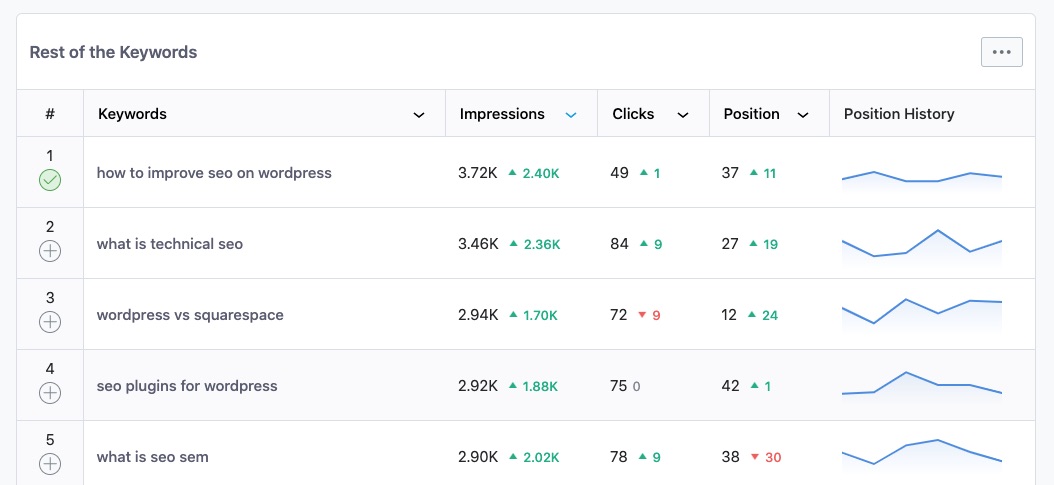
Ever wondered what magical words are helping your website float to the top of those Google searches? You're not alone! It's like trying to find your favorite book in a vast library - you need to know the right keywords to guide you. So, let's dive into this fascinating world of SEO (Search Engine Optimization) and find out what keywords your website is ranking for.
Why Should You Care?
Imagine you're at a party, and you want to talk about your favorite hobby - let's say, knitting. If you use the right words, like 'knitting patterns', 'yarn', or 'stitches', people will understand what you're passionate about and might even join in the conversation. It's the same with your website. Using the right keywords helps search engines understand what your site is about and shows it to the right people.
But why should you care? Well, think of it this way: if you're selling hand-knitted scarves, you want people searching for 'knitted scarves' to find your website, not your competitor's. That's where keywords come in - they're like your website's secret handshake with the search engines.
Must Read
How to Find Your Website's Keywords
Now, you might be thinking, "That sounds great, but how do I find out what keywords my website is ranking for?" Fret not, dear reader! There are some nifty tools out there that can help you. One of the most popular is Google Search Console. It's like having a little helper that tells you exactly what's working and what's not.
Here's a simple step-by-step guide to find your website's keywords using Google Search Console:
- Sign in to your Google Search Console account. If you haven't added your website yet, follow the instructions to add it.
- Once you're in, click on 'Performance' in the left-hand menu. This is where the magic happens!
- You'll see a graph showing your website's clicks, impressions, and average CTR (Click-Through Rate). Below that, you'll find a table with a whole bunch of data. The columns we're interested in are 'Queries' (the keywords), 'Impressions' (how many times your website appeared in search results for that keyword), and 'Position' (where your website ranked for that keyword).
- You can filter the results by date range, country, and device type. Start with the default settings and see what you find. You can always adjust the filters later.
What to Do with Your Keyword Data
So, you've found out what keywords your website is ranking for. Now what? Well, it's time to put that data to good use!
First, take a look at your website's position for each keyword. If you're ranking high (say, in the top 3), that's great! You're doing something right. But if you're not, don't worry - there's always room for improvement.

Let's say you find out that your website is ranking for 'knitting patterns' but not for 'yarn'. This could be a sign that you need to create more content about yarn - maybe a blog post about the best types of yarn for different projects, or a product description that includes relevant keywords.
You can also use your keyword data to inspire new content ideas. If you see that you're ranking for 'easy knitting patterns for beginners', you might want to create more content aimed at beginners. Or, you could take it a step further and create a whole section of your website dedicated to beginner knitting.
Don't Forget About Long-Tail Keywords
You might have heard the term 'long-tail keywords' before. These are longer, more specific phrases that visitors are more likely to use when they're closer to making a purchase. For example, 'best yarn for knitting scarves' is a long-tail keyword.
Long-tail keywords might not bring as much traffic to your website as shorter, more general keywords, but the traffic they do bring is often more valuable. That's because people who search for long-tail keywords are usually further along in the buying process and are more likely to make a purchase.

So, don't forget to include long-tail keywords in your SEO strategy. They might take a bit more effort to rank for, but they can be well worth it in the end.
Keep Your Keyword Data Up to Date
SEO is a bit like gardening - you can't just plant your seeds and forget about them. You need to keep an eye on them, make sure they're getting enough sunlight and water, and pull out any weeds that might be hindering their growth.
The same goes for your keyword data. You should check in on it regularly to see how your website is performing. Are there any new keywords you should be ranking for? Are there any keywords you've slipped down the rankings for? Use this information to guide your SEO strategy and keep your website growing.
In Conclusion
Finding out what keywords your website is ranking for is like getting a sneak peek at what's working and what's not in your SEO strategy. It's a chance to celebrate your successes and identify areas for improvement.
So, don't be afraid to dive into your keyword data. It might seem a bit daunting at first, but with a bit of practice, you'll be a pro in no time. And who knows? You might just find that your website is ranking for some keywords you never even thought of. Happy ranking!